Validity criteria
Pandora uses 12 criteria to invalidate pixels that cannot be computed or to identify particular pixels. There are two types of criteria :
Invalidity criteria : the pixel is invalid and cannot be computed.
Information criteria : the pixel is valid, the criteria gives informations on the reliability of the match.
These criteria are 16-bit encoded. Each bit represents a certain criteria and is equal to 1 if the criteria is raised and 0 otherwise.
Criteria |
Value in validity mask |
Invalidity or information |
Name in Pandora |
|---|---|---|---|
0 |
2⁰ = 1 |
Invalidity |
left no data or border |
1 |
2¹ = 2 |
Invalidity |
right no data or disparity range missing |
2 |
2² = 4 |
Information |
right incomplete disparity range |
3 |
2³ = 8 |
Information |
stopped interpolation |
4 |
2⁴ = 16 |
Information |
filled occlusion |
5 |
2⁵ = 32 |
Information |
filled mismatch |
6 |
2⁶ = 64 |
Invalidity |
invalid in left mask |
7 |
2⁷ = 128 |
Invalidity |
invalid in right mask |
8 |
2⁸ = 256 |
Invalidity |
pixel occlusion |
9 |
2⁹ = 512 |
Invalidity |
pixel mismatch |
10 |
2¹⁰ = 1024 |
Information |
filled no data |
11 |
2¹¹ = 2048 |
Information |
pixel interval regularized |
These criteria are stored in a Xarray.DataArray validity_mask in cost volume and disparity map Xarray.Datasets. The validity_mask is the same size as the left image.
Criteria can be linked to user configuration, disparity range, or mismatch and occlusion for instance.
Criteria are computed in different steps of the Pandora machine :
Matching cost
Refinement
Filter
Validation
Multiscale process
Note
The criteria are cumulative, i.e. several bits can be set for each pixel, except on the edges of the image.
Criteria raised in matching cost step
Criteria 0, 1, 2, 6, and 7 are computed during the matching cost step because the cost volume cannot be computed for some points. In this step, criteria are raised according to left and right masks and disparity range given by the user configuration.
Most of criteria are raised before the computation of the cost_volume. However, criteria 1 is also updated after this computation because we need to know which cost volume points are equal to nan to raise criteria 1 on certain points.
At the end of the matching cost step, the validity_mask is filled with integers indicating which bits, and therefore which criteria, have been set.
Criteria linked to left mask
Criteria 0: left no data or border
Criteria 0 is raised when a point is on the border of left image or is a no data value in left image mask.
For no data points in left mask, we raise criteria 0 in validity mask around points with the same coordinates as the no data in the left mask, to which a binary dilation of size of the matching cost window has been applied.
For points on the edges, we invalidate a certain number of rows and columns according to the value of the offset which is calculated from the window_size such as:

Where window_size is an input parameter of matching cost (see Matching cost computation).
For example if offset=2 we raise the criteria 0 for 2 rows on at the top, 2 rows at the botttom, 2 columns on the left and 2 columns on the right in the validity mask.
Warning
On the edges, criteria are not cumulative, which means that only bit 0 is set.
Criteria 6: invalid in left mask
Criteria 6 is raised when a point is marked as invalid in left mask in user configuration.
We raise criteria 6 in validity mask on points with the same coordinates as the invalid points in the left mask.
Example of validity mask with criteria 0 and 6 raised
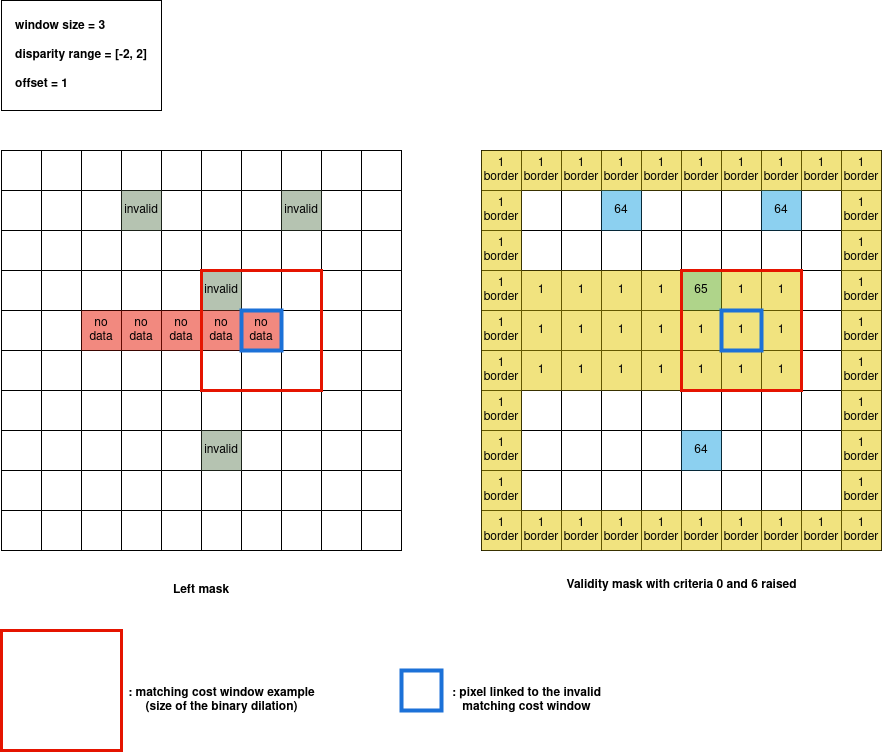
On this example the matching cost window size is equal to 3, the disparity range is [-2, 2] and the offset is 1.
Criteria 0 is raised around each no data pixel of the left mask with a binary dilation of the size of the matching cost window, as shown by the red square of size 3x3. Criteria 0 is also set on each pixel of the border, which are marked “1 border”.
Criteria 6 is raised on each invalid pixel of the left mask.
Criteria linked to right mask and missing or incomplete disparity range
Criteria 1: right no data or disparity range missing
Criteria 1 is raised when a point in right image has no valid exploration window in its disparity range. An exploration window is invalid when it contains no data points or when it is outside the image.
Criteria 1 is also set after the cost volume computation for points that meet two conditions:
their cost volume are NaN for all disparities in the disparity range.
they are not on the edge of the image.
Criteria 2: right incomplete disparity range
Note
Criteria 2 is an information and does not invalidate a point.
Criteria 2 is raised when a point in right image has part of its disparity range outside the image.
Criteria 7: invalid in right mask
Criteria 7 is raised for a pixel when all the points in its disparity range are invalid, either because they are invalid in the right mask or because they have an exploration window out of the image.
Example of validity mask with criteria 1, 2 and 7 raised
On this example the matching cost window size is equal to 3, the disparity range is [-2, 2] and the offset is 1.
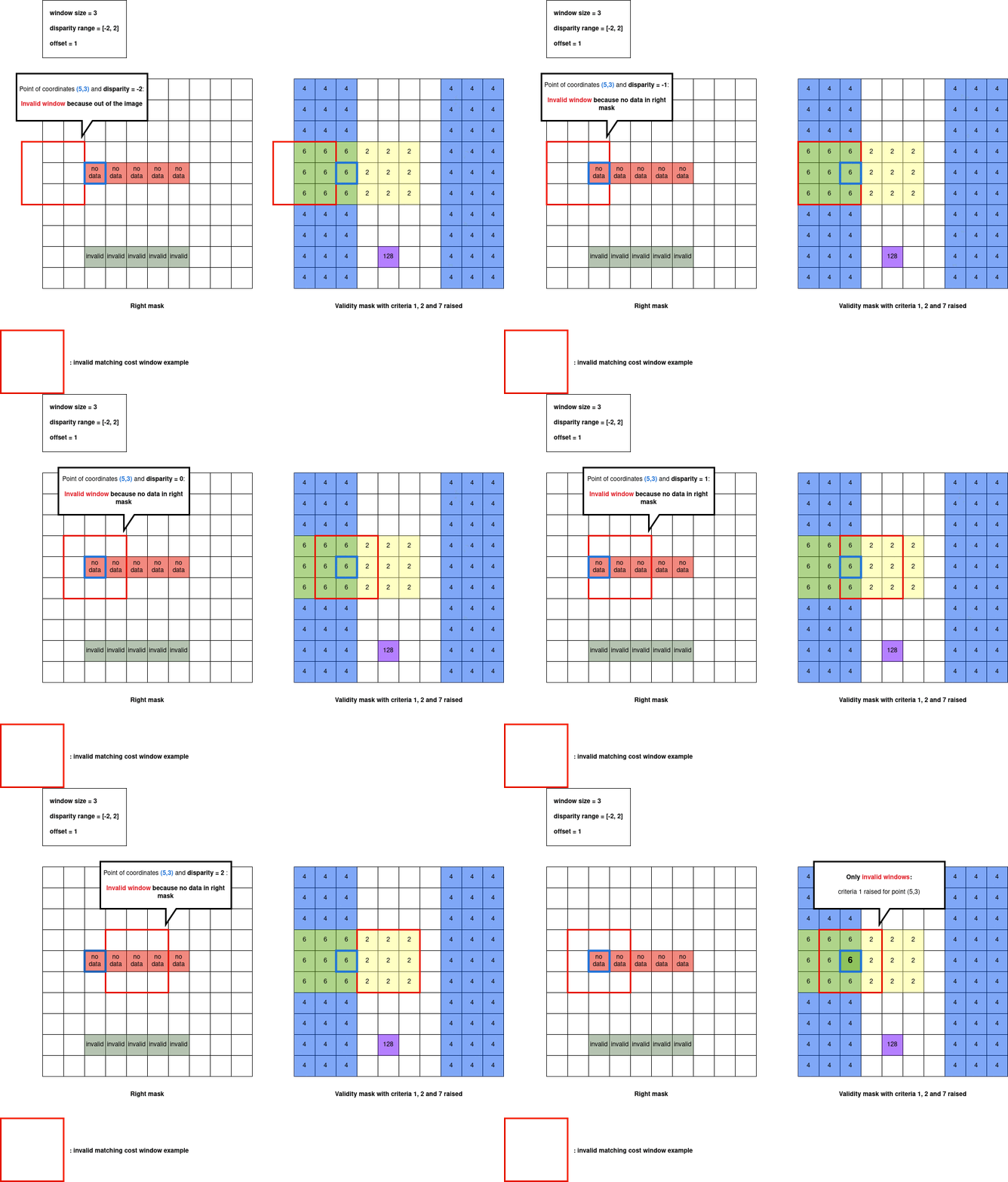
Criteria 1 is raised for each point that has no valid exploration window. Which means that if you test all exploration windows in the disparity range, you either have no data points in the right mask or you are out of the image. This is shown by the red square of size 3x3 which represents the exploration window of point (5,3) which is invalid for each disparity in [-2, 2]:
For disparity = -2 : we are out the image
For disparity = -1 : we have no data in right mask
For disparity = 0 : we have no data in right mask
For disparity = 1 : we have no data in right mask
For disparity = 2 : we have no data in right mask
We raise criteria 1 for the point (5,3). The same applies to other points with no valid exploration window.
On the other hand, for point (5,7), all the exploration windows are invalid except the one corresponding to disparity=2. As we have at least one valid window, criteria 1 is not set around point (5,7).
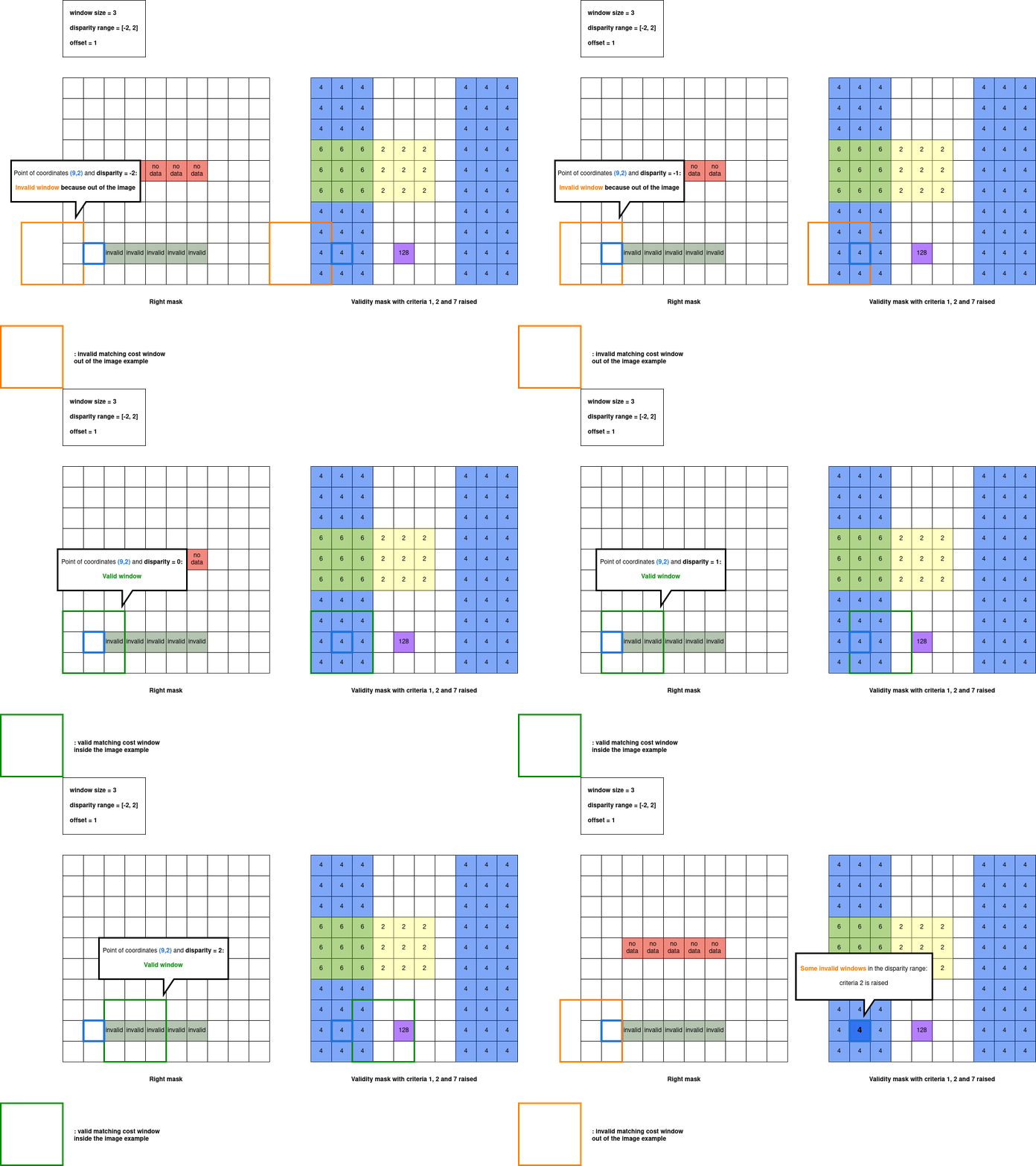
Criteria 2 is raised when a point has some of its exploration windows outside the image, but not all of them. This is shown by the orange square of size 3x3 which represents the exploration window of point (9,2) for disparity = -1. This point has invalid exploration window out of the image for disparity = -1 and disparity = -2 but has valid exploration window for other disparities.
We raise criteria 2 for point (9,2) and for all points having some of their exploration window out of the image.
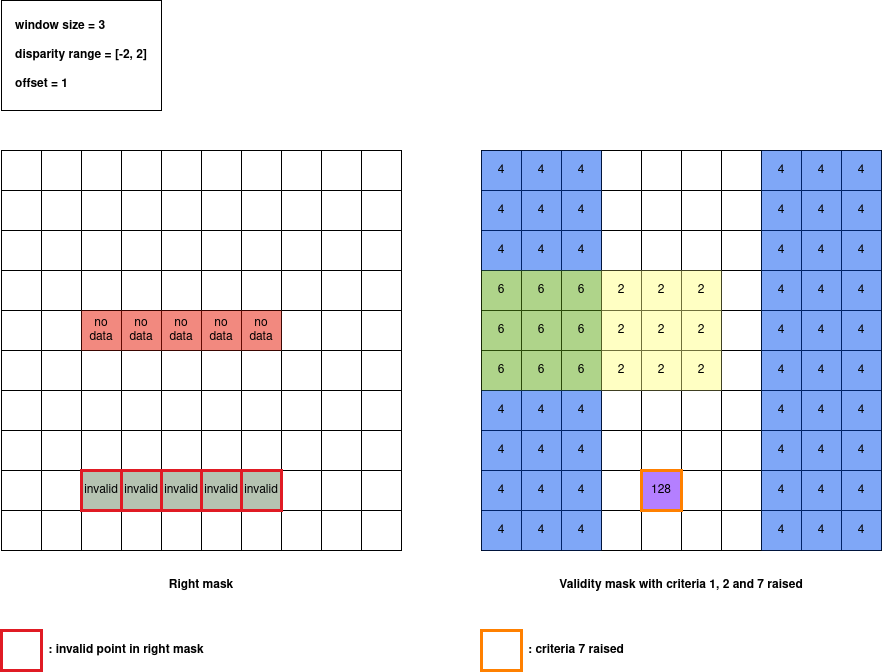
Criteria 7 is only raised for the point (9, 5) because it is the only point which has its entire disparity range invalidated in the right mask. In fact, in the mask on the right, the point with coordinates (9, 5), the two points to its left and the two points to its right are invalid.
Validity mask after matching cost step
As a reminder, here are the left and right masks used in our example :
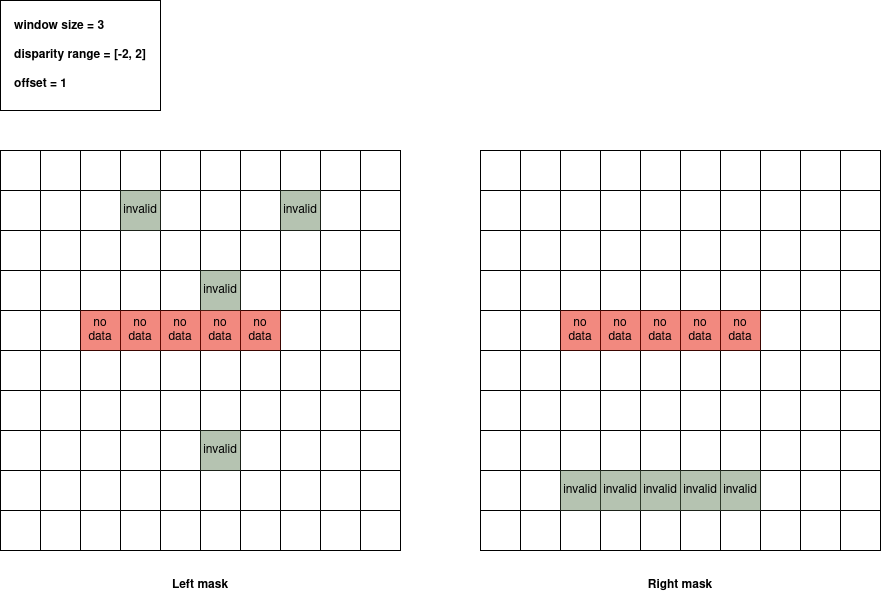
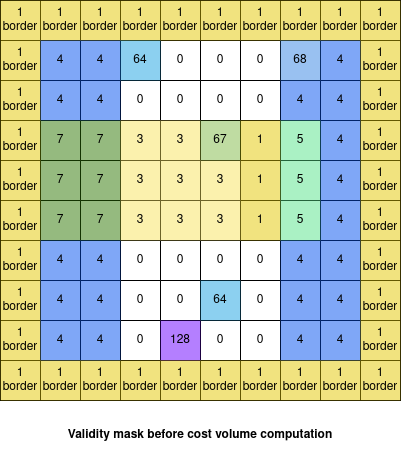
Before the cost volume computation, validity mask is filled with contributions from left and right masks added together. For the example with window_size=3, disparity_range=[-2, 2], offset=1 and the previous left and right mask we obtain the following validity mask:
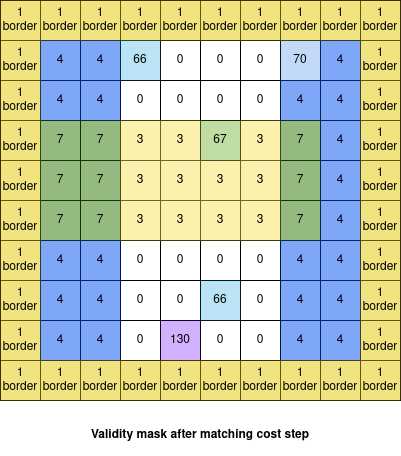
As explained before, the validity_mask is also updated after the cost volume computation : we add criteria 1 for points which are NaN in the cost volume for all disparities and which are not on the border. Then, at the end of the matching cost step we obtain the following validity mask:
Criteria raised in refinement step
Criteria 3: stopped interpolation
Note
Criteria 3 is an information and does not invalidate a point.
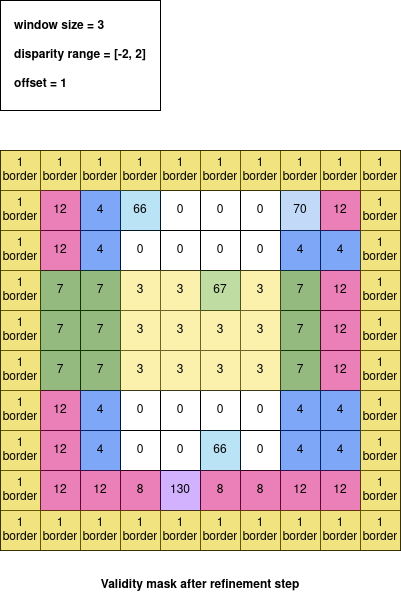
Criteria 3 is raised when the subpixel interpolation does not succeed for a point.
Validity mask after refinement step
In our previous example, after a refinement step with a quadratic method we obtain the following validity mask:
Criteria raised in filter step
Criteria 11: pixel interval regularized
Note
Criteria 11 is an information and does not invalidate a point.
Criteria 11 can be raised when the median for intervals method is used as a filtering step.
It is set in the validity mask when the corresponding point has been regularized in the disparity map.
Criteria raised in validation step
Criteria 4: filled occlusion
Note
Criteria 4 is an information and does not invalidate a point.
Criteria 4 is raised when an occlusion point has been filled by one of the method described in Validation of the disparity map.
Criteria 5: filled mismatch
Note
Criteria 5 is an information and does not invalidate a point.
Criteria 5 is raised when a mismatch point has been filled by one of the method described in Validation of the disparity map.
Criteria 8: pixel occlusion
Criteria 8 is raised when a point is considered as an occlusion (see Validation of the disparity map).
Criteria 9: pixel mismatch
Criteria 9 is raised when a point is considered as a mismatch (see Validation of the disparity map).
Validity mask after validation step
In our previous example, after a validation step with a cross checking accurate method we obtain the following validity mask:
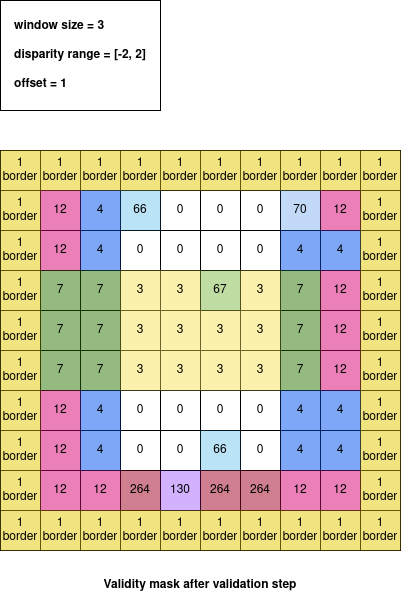
In our case, only occlusion points have been detected.
Below we can find all the criteria raised after a validation step in our example:

Criteria raised when we use multiscale processing
Criteria 10: filled no data
Note
Criteria 10 is an information and does not invalidate a point.
Criteria 10 is used in the case of a multiscale processing. In this case, we interpolate the no data pixels in the input image. For these pixels, criteria 10 is raised.